
Even after releasing an eleOTA updates in electronicsctronic device, developers can keep improving its software. Firmware updates make it possible to:
- Fix previously undiscovered bugs
- Patch vulnerabilities
- Add new features and support for new hardware
- Improve performance and stability
But developing a new software version is not enough; the company also has to deliver it to the device somehow. One way is to send a technician on site to install the new firmware with a programmer or a service computer, or send the firmware file to the customer for manual installation. However, when supporting a large fleet of devices, it is preferable to rely on over-the-air (OTA) updates, i.e., updates delivered over a wireless network.
The key advantage of OTA is that you can update a large number of devices without physical access to them. Manual installation requires a technician to visit each site, which can take months and incur significant costs when managing thousands of devices. OTA makes it possible to update the entire fleet at once.
An OTA infrastructure also makes it possible to control the update process—from downloading the file and verifying its integrity to installing the new version and confirming that the update was successful. This reduces reliance on user intervention and the risk of errors during manual installation.
The firmware architecture should have mechanisms for downloading and verifying a new version, protection against installing invalid software, and a recovery mechanism in case of failure. If these capabilities are not built into the product from the beginning, adding OTA after release can be difficult or even impossible.
How OTA Firmware Updates Work
A complete OTA update cycle consists of the following steps (some of them are optional):
1. The developer builds and tests a new software version and then uploads it to a server. The company also publishes a manifest file containing metadata and the update policy along with the cryptographic hash of the firmware (to verify the file’s integrity) and a digital signature (to confirm its origin).
2. The device polls the server and provides information about its model and current software version. If a suitable update is available, the server reports its version, size, hash, and other required parameters.
3. The device reads the manifest to check that the update is compatible with the device model, the version is permitted by the update policy, there is enough storage space, and the battery has sufficient charge. The device also checks the configured update policies and verifies the digital signature of the metadata.
4. The device downloads the update package. This can be either a full firmware image or a patch containing only the modified data. Large files are typically transferred in chunks. This allows the download to resume from where it left off if the connection is lost.
5. The device verifies the data. It calculates the hash of the downloaded file and compares it with the value in the manifest to make sure it is not corrupted. It also verifies the digital signature of the firmware. If the integrity or authenticity of the file cannot be confirmed, the installation is aborted.
6. The device installs the new version and reboots. After startup, the firmware performs a self-test. If the new version fails to start or doesn’t work correctly, the recovery mechanism can restore the previous firmware.
7. The device sends a report to the server. This allows the update management system to record the outcome and track the current status of each device.
Key Challenges in OTA Development
OTA operates without physical access to the device, so a connection loss, a firmware bug, or a failure during file overwrite can render the device inoperable. When designing such a system, the main engineering challenges involve communication reliability, security, release management, and rollback.
Connection loss. A device may lose connection during a download due to poor coverage or when switching between access points. To reduce this risk, firmware is typically transferred in chunks. In this case, the device can resume the download after a connection failure instead of starting over.
Cybersecurity. Before installation, the device must verify that it has received the image released by the authorized developer. That’s why the update file is protected with a digital signature. It is generally recommended to provide mechanisms for key management and rotation rather than simply hard-coding a single public key into the device.
One also has to protect the data communication channel with the server. Using TLS is typically sufficient. Downgrade attacks are another risk that should be avoided. Update policy must not allow the device to install older software versions that are technically valid but contain a vulnerability an attacker may exploit.
Release management. The update process should be reproducible, with controlled versioning, automated generation of firmware images and manifest files, hash calculation, and other verification steps. A new firmware version should not be deployed to the entire fleet immediately. The safer approach is to test it on in-house devices and then deploy it to a small pilot group of released products. If anything goes wrong, the team can stop the process and roll back the firmware version.
Recovery after a failure. Installation may fail because of power loss; the firmware may not be written correctly to flash memory; or the new version may fail to start. Therefore, if the hardware resources permit, engineers should implement a recovery mechanism that can roll back to the previous firmware version. This is typically achieved using an independent bootloader, verifying the image before installation, and limiting the number of attempts to boot the new version. Once the limit is exceeded, the device activates the previous software version.
The specific OTA architecture also depends on how much memory is available on the device and how it stores firmware versions.
Firmware Storage and Update Architectures
The choice of OTA architecture depends primarily on the amount of available memory, reliability requirements, and device cost. The most common architectures are single-slot and dual-slot designs.
Single-Slot OTA
With this approach, the memory contains the bootloader, a firmware area, and user data. The new version is written directly over the current one as it is downloaded.
The obvious drawback of this approach is the risk of rendering the device inoperable if power is lost during the write process. The bootloader is not erased, so the update can be retried after the device restarts. However, the device cannot continue running the old firmware if part of it has already been overwritten.
A more reliable option is to allocate a separate memory area that will temporarily store the update package. The device first downloads the new firmware image to that area and verifies it, and only then writes the image to the active firmware area. If a failure occurs during the download, the old version continues to run. However, once the update starts, there is no protection against power loss.
Developers can use a special flag before starting the write operation. It is set to update_in_progress=1 and cleared after the update completes successfully. If the device restarts prematurely, the bootloader detects the incomplete update and retries the operation.
Dual-Slot OTA
In a dual-slot architecture, memory is divided into two firmware slots. The device runs from one slot while the new version overwrites the inactive one. Once the write operation is complete and the new image has been verified, the bootloader switches to the new slot.
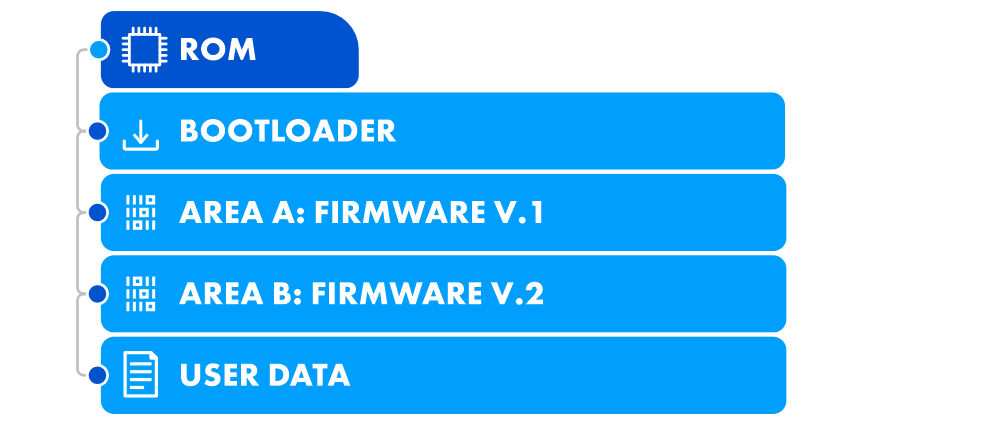
If power is lost during the download, the active firmware in slot A remains operational. An attempt counter provides additional protection: if the new version fails to start a specified number of times, the bootloader automatically rolls back to the previous version.
This approach provides more reliable updates and recovery from failures, but it requires more memory, which increases the device cost. Additionally, implementing a dual-slot architecture in an existing product may be impossible without modifying the hardware.
In practice, engineers don’t always implement OTA updates using a standard approach. They choose the architecture based on available memory, cost constraints, reliability requirements, and the specific characteristics of the product. The following cases serve as examples of such non-standard solutions.
Examples of Non-Standard OTA Implementations
Radio-Based Firmware Updates
The following case study from Integra Sources involved developing a remote equipment control system. It includes actuator controllers, a console, and a mobile application. The system has to operate in locations with no Internet access, so the console and the controllers communicate over a radio link.
A conventional OTA architecture based on an update server was not suitable for this solution. Therefore the team turned the console into a firmware repository that transfers firmware images to the controllers over the existing radio link.
The mechanism uses a custom bootloader and firmware transfer protocol built on top of Modbus RTU. Modbus runs over UART connected to the radio module, so the protocol’s limitations directly affect the update process.
Key characteristics of the solution:
- Standard Modbus RTU limits the PDU size to approximately 253 bytes. Therefore, the firmware is transferred in pages of up to 4 KB. Each page is split into a sequence of Modbus register-write transactions. The controller assembles the image from the received data and writes it to a buffer.
- The system doesn’t use a manifest file. Instead, the DFU image header serves this purpose, as it contains both the metadata and the firmware itself.
- To keep costs down, the team chose not to use a dual-slot architecture. Therefore, there is no automatic rollback function: if an update fails, the controller enters a recovery mode and waits for new commands over Modbus.
- The update register handler is implemented in both the main firmware and the bootloader. Therefore, a new firmware version can be transferred even when the main firmware won’t start. This makes it possible to recover the device without physical access.
This project shows that an over-the-air update does not necessarily follow the conventional device-to-internet-to-server model. Instead, it can simply deliver a binary image over a radio link and write it reliably to flash memory.
Updating Devices in a Mesh Network
Another project involved OTA updates for devices operating within a Bluetooth Mesh network. The solution is designed to track the location of people and equipment in mines. The system consists of gateways and BLE beacons, with data transmitted through a mesh network of relay nodes.
The main challenge was updating all the relay nodes without disrupting the network. The firmware image is transferred from the server to a gateway and then distributed through the network from top to bottom, one level at a time. The download continues until all nodes have received the file.
The update itself proceeds in the opposite direction: the firmware is first installed on the relay nodes at the lowest level. After they restart and complete the update, the process moves up to the next level. This approach keeps the network connected for most of the update process.
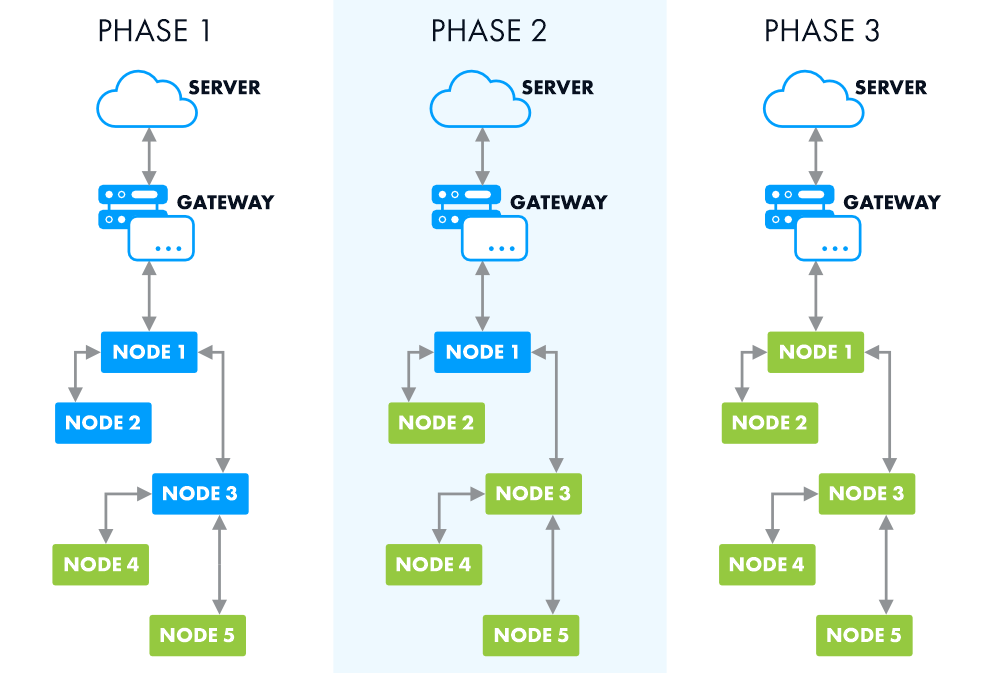
If the new firmware fails to start, the node rolls back to the previous version. However, once it reconnects to the network, it detects that a newer firmware version is available on the upper-level device and attempts the update again. To prevent repeated update-and-rollback cycles, the upper-level node is also rolled back in this scenario. As a result, two devices are temporarily taken offline, but the network is not overloaded with repeated transfers.
If a relay node joins the network after the update process has already started, it does not receive the new firmware immediately. Once the upper-level node has been updated and restarted, the relay reconnects, detects the new version, and requests the file.
These two projects show that OTA architecture can be determined by the network topology, available communication channels, memory capacity, and recovery requirements.
Conclusions
An OTA system should not be designed as a separate feature that can be added at the end of the development process. It should be treated as a fundamental part of the product architecture. This approach makes it possible to plan ahead for digital signature verification, protection against installing vulnerable versions, secure key storage, and confirmation that updates were successful. For a large device fleet, it is also essential to support staged deployments, monitor update results, and provide a way to quickly stop the rollout of a problematic firmware version.
If you need a team to build OTA capabilities into your next device, you can compare vetted embedded development providers on Software Outsourcing Journal.